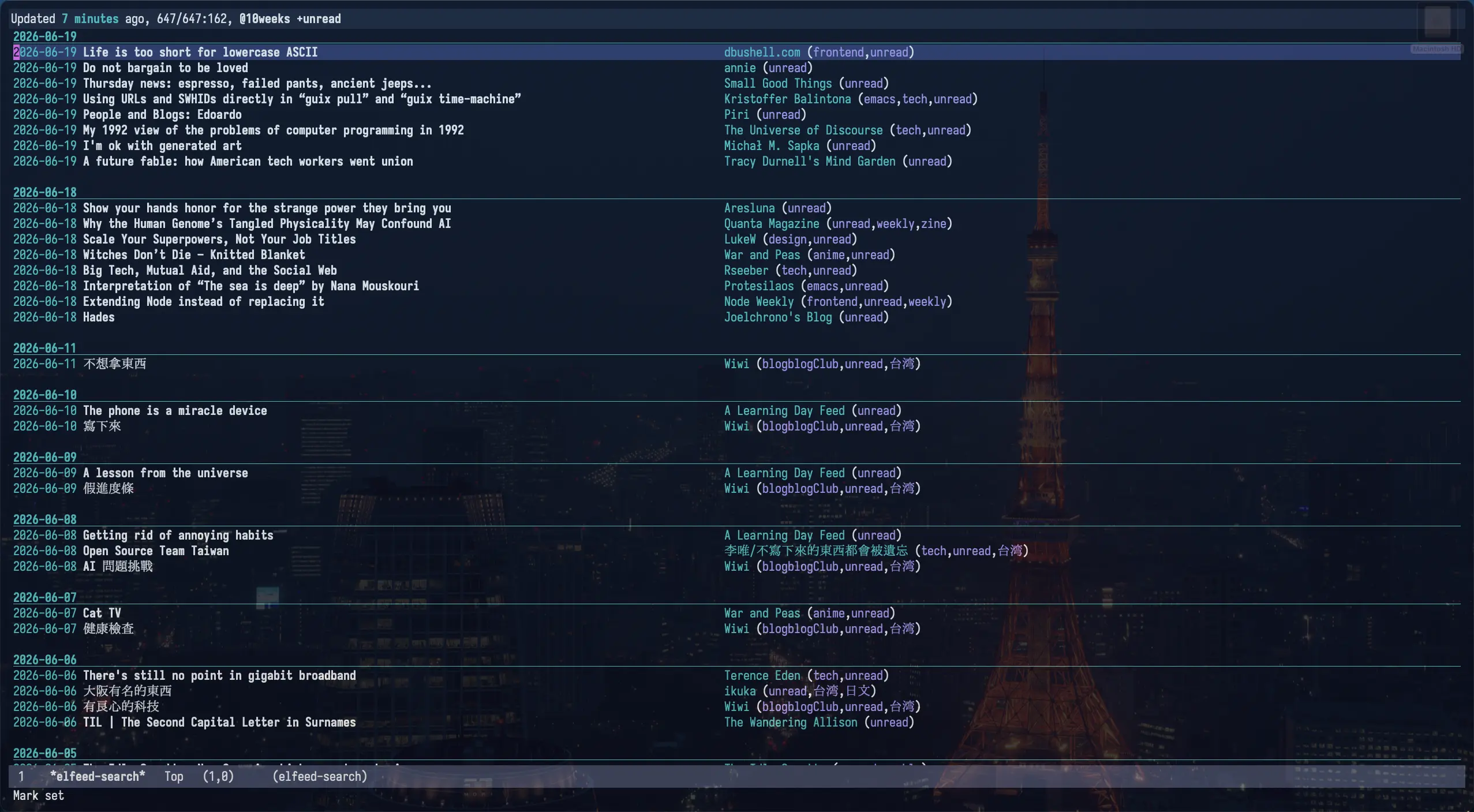
Elfeed 是一個 Emacs 里的 RSS 閲讀器,關於 Elfeed 之前寫過一篇 在 Emacs 中用 Elfeed 阅读订阅流,那篇文章没怎麼展示 Elfeed 的使用,更多還是在分享一些工具函数。前陣子 Elfeed 也更新到了 4.0.0,新增了很多方便的功能,我最近也用的很多,所以再分享一下它的使用,或許你會想嘗試一下它。
為了更直觀了解,我录󠄃了個視頻,也可以看看:
- YouTube: Elfeed 4.0.0 使用分享
- Bilibili: Elfeed 4.0.0 使用分享
有點囉嗦,推薦 1.5 倍速看。
視頻濱示中的配置
(defconst *is-a-mac* (eq system-type 'darwin))

;;; 设置 mac 的快捷键
(when *is-a-mac*
  (setq mac-command-modifier 'meta
      mac-option-modifier 'super))

;;; 設置默認字體大小
(set-face-attribute 'default nil :height 250)

;;; 添加 package 的下載仓庫,melpa 上有更多的擴展
(require 'package)
(add-to-list 'package-archives '("melpa" . "https://melpa.org/packages/") t)
(add-to-list 'package-unsigned-archives "melpa")

;;; 調整 elfeed 数据庫的目录󠄃位置
(setq elfeed-db-directory "~/Downloads/emacs-config/.elfeed")

;;; 添加訂閱流
(setq elfeed-feeds
      '(("https://taxodium.ink/rss.xml" :title "Taxodium"  emacs zine)
      ("https://kagi.com/api/v1/smallweb/feed/" :title "Kagi Small Web" )
      ("https://bf.zzxworld.com/feed.xml" :title "BlogFinder" :no-update t :fetch-link t feeds )))

;;; 設置 *elfeed-search* 頁面的時間格式,會影响分組的展示
(setq elfeed-search-separator-date-format "%Y-%m-%d")

;;; 設置默認的過濾条件
(setq-default elfeed-search-filter "@1weeks +unread")

;;; 拉取新条目時,將一個月前的自動標記為己讀
(add-hook 'elfeed-new-entry-hook
          (elfeed-make-tagger :before "1 months ago"
                              :remove 'unread))

;;; 閱讀時開啟 `olivetti-mode',讓內容居中展示
(defun spike-leung/preview-elfeed-with-olivetti ()
  "Preview elfeed with `olivetti-mode'."
  (olivetti-mode)
  (olivetti-set-width 80)
  (visual-line-mode))
(add-hook 'elfeed-show-mode-hook #'spike-leung/preview-elfeed-with-olivetti)

;; 增強自動補全
(use-package vertico
  :init
  (vertico-mode))

;; 允許補全關鍵字无序
(use-package orderless
  :custom
  ;; Configure a custom style dispatcher (see the Consult wiki)
  ;; (orderless-style-dispatchers '(+orderless-consult-dispatch orderless-affix-dispatch))
  ;; (orderless-component-separator #'orderless-escapable-split-on-space)
  (completion-styles '(orderless basic))
  (completion-category-overrides '((file (styles partial-completion))))
  (completion-category-defaults nil) ;; Disable defaults, use our settings
  (completion-pcm-leading-wildcard t)) ;; Emacs 31: partial-completion behaves like substring

;;; 讓補全顯示注解 (annotation)
(use-package marginalia
  ;; Bind `marginalia-cycle' locally in the minibuffer.  To make the binding
  ;; available in the *Completions* buffer, add it to the
  ;; `completion-list-mode-map'.
  :bind (:map minibuffer-local-map
              ("M-A" . marginalia-cycle))

  ;; The :init section is always executed.
  :init

  ;; Marginalia must be activated in the :init section of use-package such that
  ;; the mode gets enabled right away. Note that this forces loading the
  ;; package.
  (marginalia-mode))

(custom-set-variables
 ;; custom-set-variables was added by Custom.
 ;; If you edit it by hand, you could mess it up, so be careful.
 ;; Your init file should contain only one such instance.
 ;; If there is more than one, they won't work right.
 '(package-selected-packages '(elfeed marginalia olivetti orderless vertico)))
(custom-set-faces
 ;; custom-set-faces was added by Custom.
 ;; If you edit it by hand, you could mess it up, so be careful.
 ;; Your init file should contain only one such instance.
 ;; If there is more than one, they won't work right.
 )
安装
Elfeed 運行在 Emacs 中,關於 Emacs 的安装1 和使用這里就不贅述了,之前可以參考之前寫的 如何上手 Emacs。我想說的是,Emacs 安装和簡单使用并不難, Emacs 也有圖形界面,也可以通過鼠標完成大部分常用操作,不必看到 Emacs 就望而止步。不過請至少閲讀一遍 Emacs tutorial,下面的安装我會假設你己經讀過一遍了。
Elfeed 的安装參考 Elfeed 的 README,大致這几步:
- 执行
M-x package-install,輪入elfeed进行安装 配置 Elfeed,可以寫在
~/.emacs.d/init.elEmacs 的配置一般寫在
~/.emacs.d/init.el,取决於的操作系統路徑可能有差异。(setq elfeed-feeds '("https://taxodium.ink/rss.xml" "https://kagi.com/api/v1/smallweb/feed/"))- 执行
M-x load-file,輪入~/.emacs.d/init.el,讓 Emacs 加載init.el里的配置
這樣就安装好了,之後可以执行 M-x elfeed 打開 Elfeed 閲讀,执行 M-x elfeed-update 拉取訂閱流获取更新
(也可以在 Elfeed 的 buffer 按 G 触發)。
管理訂閱流
Elfeed 的訂閲流是在一個配置文件(例如 init.el )中配置的, 格式如下:
(setq elfeed-feeds
      '(("https://taxodium.ink/rss.xml" :title "Taxodium")
        ("https://protesilaos.com/master.xml" :title "Protesilaos" emacs)
        ("https://www.stefanjudis.com/rss.xml" :title "Stefan Judis" weekly frontend)
        ("https://bf.zzxworld.com/feed.xml" :title "BlogFinder" :no-update t :fetch-link t feeds blog)
        ("https://kagi.com/api/v1/smallweb/feed/" :title "Kagi Small Web" :no-update t :fetch-link t feeds blog)))
上面我添加了 5 条訂閱流,其中
:title可以指定顯示的名称。:no-update可以讓訂閱流默認不更新,需要手動去触發更新。有的訂閲流更新太多太頻繁,就可以讓它們默認不更新,什麼時候想看再用elfeed-update-feed手動触發更新。更好的補全
elfeed-update-feed支持自動補全,但默認的補全不是很好用。建議安装 minad/vertico 、oantolin/orderless、minad/marginalia 获得更好的補全。:fetch-link有的訂閲流只包含原文鏈接,設置:fetch-link可以自動拉取鏈接內容。- 剩下的
emacs、weekly等是標簽。 (添加標簽後,执行M-x elfeed-apply-autotags-now可以更新己有条目的標簽)
更多配置見 Elfeed 的 README。
可以看到這就是一些有一定格式的文本,很容易編輯、搜索,所有用於文本的編輯技巧都能用上,例如多指針編輯、正則替換等,比許多圖形介面要方便的多。
如果後面想換一個閱讀器,可以执行 M-x elfeed-export-opml 將所有訂閱流导出。
閱讀
执行 M-x elfeed 就可以打開 Elfeed 閱讀,在 Elfeed 的 buffer 按 G (elfeed-update) 触發更新
(那些設置了 :no-update t 的訂閱流不會被触發)。
默認視圖是按月份分組的。

我更傾向於按天分組,可以在 init.el 中添加配置,設置默認按天分組:
(setq elfeed-search-separator-date-format "%Y-%m-%d")

按下 o (elfeed-search-cycle-order) 可以切換分組模式,默認在按日期分組和按訂閱流分組之間切換。

在条目上,按下 ENTER (elfeed-search-show-entry) 可以查看条目的文章內容,它是通過解析 XML 呈現的,不會加載 JS、CSS,只顯示 HTML 的內容,可以說很簡陋,但它也更干净,没有太多干擾。

在条目上按下:
- b (
elfeed-search-browse-url) 可以用默認瀏覧器打開条目。 - r (
elfeed-search-untag-all-unread) 可以標記己讀, - u (
elfeed-search-untag-all-unread) 可以標記未讀。
更多可以參考 README,或者执行 M-x describe-mode 查看 elfeed-search-mode 的按鍵綁定。

搜索過濾
在条目上按下:
- @ 可以基於条目的日期過濾,例如条目的日期是 2026-06-01,按下後就只顯示 2026-06-01 往後的条目。
- = 可以基於条目的訂閱流過濾,例如条目属於 taxodium.ink,按下後就只顯示属於 taxodium.ink 的条目。
- ~ 可以排除条目的訂閱流,例如条目属於 taxodium.ink,按下後就不會顯示属於 taxodium.ink 的条目。
在 Elfeed 的 buffer (*elfeed-search*) 上,按下 s (elfeed-search-live-filter) 可以輸入過濾條件實時過濾,可以按照日期、訂閱流名称、条目名称、標簽 (支持自動補全) 過濾,也支持設置排除条件,具體語法可以參考 Filter Syntax。
4.0.0 還增加了 Tree View,可以集中查看所有標簽,执行 M-x elfeed-tree 可以打開 Tree View 視圖。

Tree View 的結构和標簽的位置有關:
("https://yhetil.org/emacs-devel/new.atom" emacs lists)emacs 會作為根節點,lists 是它下面的子節點。("https://yhetil.org/emacs-devel/new.atom" lists emacs)lists 會作為根節點,emacs 是它下面的子節點。
其它
默認過濾条件
默認過濾条件是 @6months +unread ,即近 6 個月未讀的条目,但我只想看最近一周,可以修改 elfeed-search-filter :
(setq-default elfeed-search-filter "@1weeks +unread")
過濾條件語法參考 Filter Syntax。
將某個時間之前的条目自動標記己讀
新增訂閱流時,我可能只是想看作者的後續更新,有的訂閱流可能塞进了所有文章,就會一下子出現大量未讀条目。
我只想看最近一個月的,可以在拉取時讓 Elfeed 自動將一個月前的標記為己讀。
(add-hook 'elfeed-new-entry-hook
          (elfeed-make-tagger :before "1 months ago"
                              :remove 'unread))
更多見 Tag Hooks。
优化閱讀體驗
我的顯示器比较寬,默認內容都在左側,閱讀起來不舒服。在閱讀時我會開啟󠄁 olivetti-mode 讓內容居中。
(defun spike-leung/preview-elfeed-with-olivetti ()
  "Preview elfeed with `olivetti-mode'."
  (olivetti-mode)
  (olivetti-set-width 80)
  (visual-line-mode))
(add-hook 'elfeed-show-mode-hook #'spike-leung/preview-elfeed-with-olivetti)
