
17 Jun 2026 - Posted by Savio SiscoAuthorization testing is one of the most repetitive, yet 2026-6-17 09:16:49 Author: blog.doyensec.com(查看原文) 阅读量:2 收藏
17 Jun 2026 - Posted by Savio Sisco
Authorization testing is one of the most repetitive, yet critical tasks in web app security testing. Checking for horizontal and vertical privilege escalation, IDORs, and other access control issues requires constantly swapping cookies and headers between different user sessions, a process that is error-prone and often becomes tedious.
Today, we’re excited to release Session Switcher, a Burp Suite extension that lets you save and switch HTTP sessions with just a couple of clicks, right from the request editor.
The Problem
During a typical authorization test, you might very often find yourself needing to to:
- Copy cookies from one browser session and paste them into Repeater requests
- Keep track of multiple user roles and their authentication tokens
- Manually update expired JWTs or session cookies
Doing this manually a couple of times is fine, but having to repeat it multiple times across different endpoints is slow, breaks your focus, and makes it easy to mix up sessions or forget to update expired tokens, potentially leading to false positives and negatives. I don’t know about everyone else, but the number of times I’ve had to go back and replace the cookies again because I wasn’t sure whether I had copied the correct ones is more than I care to admit.
The Solution
Session Switcher adds a Sessions tab directly into Burp’s request editor where you can store named sessions (basically a set of cookies and headers) and swap between them with a single click. Instead of copying and pasting authentication data across requests, you save each user’s session once and then switch to it from a dropdown whenever you need to test a different user/role/tenant. The extension also monitors Proxy traffic and can automatically keep sessions up to date, mirroring the browser, so your stored sessions stay valid throughout the entire engagement.
How Session Switcher Works
Saving Sessions
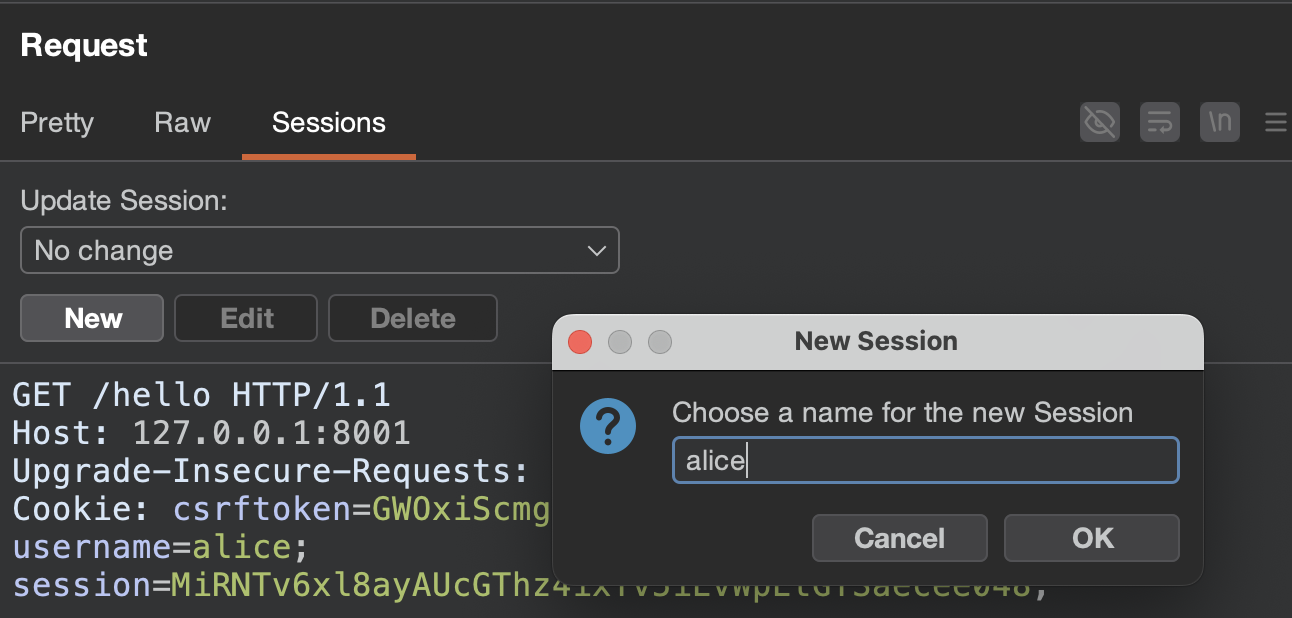
To save a session, select any request containing the cookies and headers you want to store and click the New button in the Sessions tab of the request editor. The extension automatically extracts all cookies and uncommon headers from that request.
Switching Sessions
Once you have saved sessions, a session selector appears in the Sessions tab of the request editor. Choose a session from the dropdown and the extension instantly replaces the request’s cookies and headers with the saved ones.
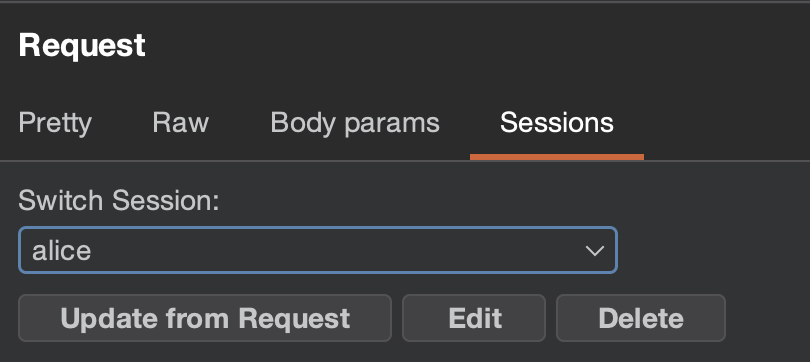
This works wherever there’s an editable request editor, such as in Repeater and with intercepted Burp Proxy requests. Buttons under the selector let you Edit, Delete, or Update the selected session from the current request, or create a New one.
By default, the session list is filtered to only show sessions matching the current request’s domain, keeping things clean when you have many sessions stored.
Sessions Management Tab
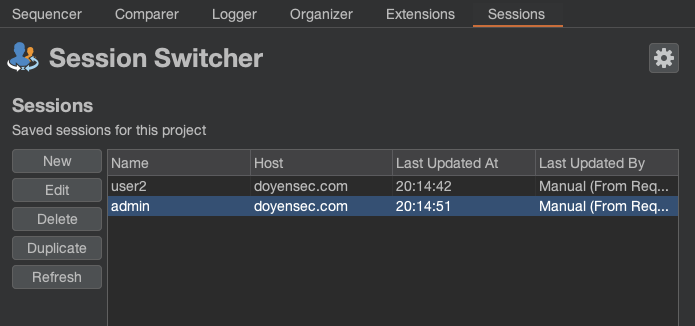
The main Sessions tab lists all sessions stored in your project file, giving you a centralized view to inspect and manage all saved sessions.
Auto Update Rules
One of the most powerful features is the ability to automatically keep sessions up to date with the current state of the browser. You can define rules that monitor browser traffic going through Burp Proxy and update sessions whenever new cookies or headers are detected.
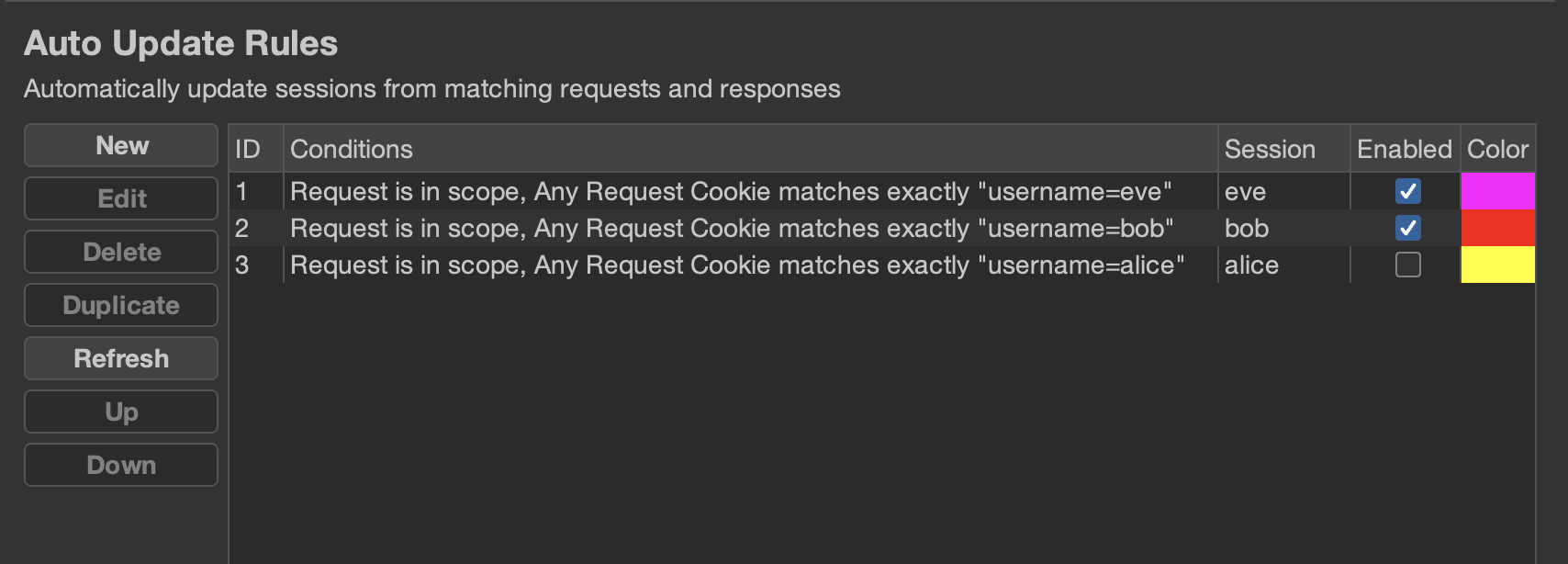
For example, you could create a rule that tracks all requests containing the X-User: alice header and automatically updates the alice session whenever the cookies change. This means you no longer have to manually update sessions when a JWT expires or you re-authenticate in the browser.
This is the simplest example, but much more complex conditions are available, such as tracking JWTs by payload. Check out the documentation for details.
Settings
If the default behavior doesn’t quite fit your workflow, the settings panel lets you tweak things like how cookies and headers are captured from requests and how they get applied when you switch sessions. Some of the options may be confusing, so make sure to check out the documentation for all the available options and what they do.
Installation
Download the latest .jar from the releases page and load it in Burp as a Java extension.
This extension will also be available on the PortSwigger BApp Store as soon as our submission is approved. Due to the current review backlog, our request has not yet been processed, even though it was submitted on April 29th, 2026.
Note: Session Switcher requires Burp Suite v2025.5 or later.
For the Future
We have a few ideas on where to take Session Switcher next:
- Auto Inject rules – the counterpart to Auto Update Rules. While Auto Update monitors Burp Proxy traffic to capture sessions, Auto Inject would automatically apply a session to requests passing through Burp Proxy, letting you transparently switch the identity of your browsing session without touching individual requests.
- Smarter session tracking – right now, keeping sessions up to date requires manually defining Auto Update rules. We’d like to explore ways to detect and track sessions automatically, for example by parsing login responses or monitoring for token changes, without requiring the user to configure rules upfront.
- Macro-based session refresh – instead of relying on a browser to reauthenticate when a session expires, the extension could send a pre-configured request (like a login or token refresh endpoint) and parse the response to update the session automatically. This would make it possible to keep sessions alive indefinitely without any manual intervention.
These are still on the drawing board, so if any of these sound particularly useful (or if you have other ideas), let us know!
Contributing
We’d love to hear how you use Session Switcher and what could make it better for your workflow. Whether it’s a bug report, a feature idea, or just general feedback, don’t hesitate to open an issue on GitHub or reach out on social media (@Doyensec). Pull requests are also very welcome!
如有侵权请联系:admin#unsafe.sh